Source: https://atomic-works-test.docs-staging.pageloop.ai/monitors/dr.-sprinto-and-manual-inputs/how-do-you-copy-the-debug-report-for-dr.-sprinto
# How Do You Copy The Debug Report For Dr. Sprinto
# How do you copy the debug report for Dr. Sprinto
The following guide helps you to get the debug report from the installed Dr. Sprinto app on your computer.
A debug report typically consists of database operations, system processes, and encountered errors during the tasks. This debug report helps us understand the issue better and provide a viable solution quickly.
Below are the procedures for getting a debug report based on the operating system you are using:
**Windows**:
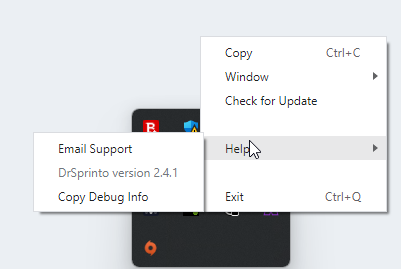
1. Go to the Windows taskbar and navigate to the installed Dr. Sprinto app.
2. **Right-click** the Dr. Sprinto app, and navigate to **Help** > **Copy Debug info**.\
**Note**: The Debug log gets copied to your clipboard.
**Mac**:
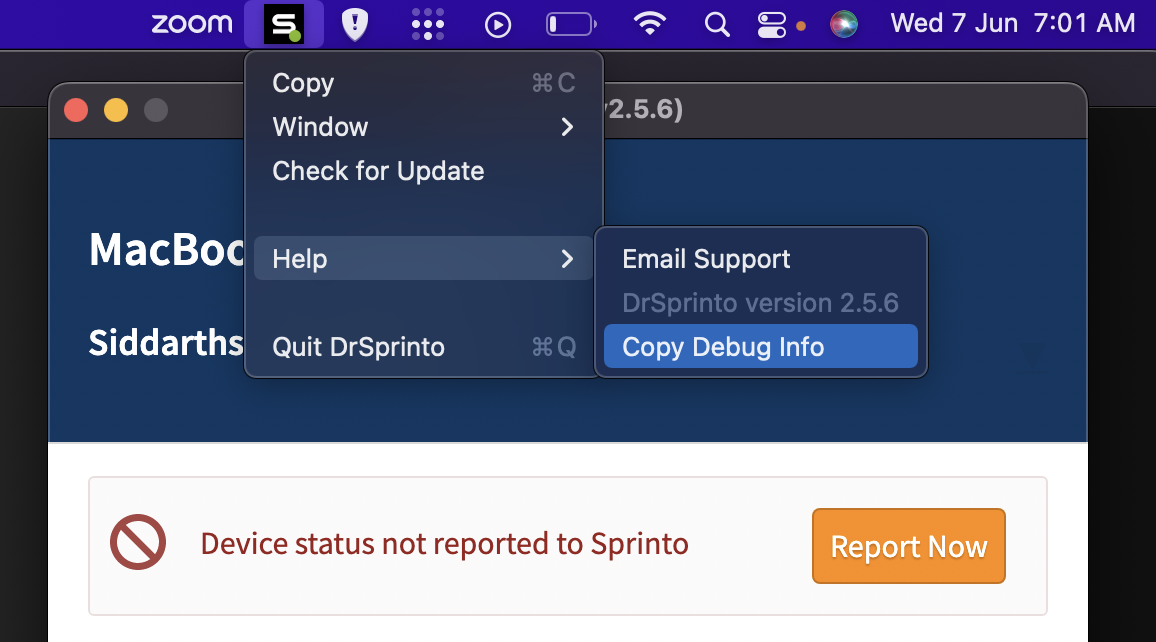
1. Open the Dr. Sprinto app and hover over the top bar to the Dr. Sprinto icon.
2. **Right-click** the Dr. Sprinto icon from the top bar, then navigate to **Help** > **Copy Debug Info**.\
**Note**: The Debug log gets copied to your clipboard.
Paste the copied debug report in the email and send it to [Sprinto support](mailto:www.support@Sprinto.com).